Posted by RikolaMint on 2:07 AM with 1 comment
Important info
Wallet Type: Desktop
Verification: full Node
Multisig: No
Open source: Yes
Privacy : Good
Crypto supported: bitcoin
Vulnerability to malware: Vulnerable
Private key stored: client side
Pros :
Bitcoin's OG, seven years and counting
Run the full node and contribute to the network!
Cons :
Hasn't really kept up with those newfangled wallets
Not HD
Desktop only
Summary
This is the mothership. Download Bitcoin QT, become a full node, and join the revolution. While this isn't the best wallet, or the most convenient, or the most secure, or the easiest to use, or the prettiest, it IS the oldest and has passed the test of time. If you prefer a more mature partner - with all the charm that entails - this is the one for you.
Getting started
Head over to bitcoin.org and download the bitcoin core wallet. When you first get the client up and running, you will notice a box at the bottom called "synchronizing with the network". As bitcoin core is a full node, get ready for a long wait, as you begin to download close to 8 years worth of blockchain records! PRO TIP: If the syncing seems to get stuck, click the "reload" sign. Learned that one from experience.
While you are waiting, you can go ahead and take care of some house keeping. Click on settings, and select "encrypt wallet". You'll be prompted to enter a new passphrase - 10 or more characters or eight or more words. Once you have encrypted the wallet it is entirely up to you to remember your passphrase! Failure to do so will render your bitcoin lost FORVER!!!
After you've encrypted the wallet, be sure to create a backup. This is best done on a usb drive or somewhere that is not the same computer upon which bitcoin core is running. The purpose of the backup is, after all, to be able to replicate the wallet elsewhere - most preferably on an encrypted USB drive. Simply navigate to file, select backup wallet, and save the .dat file to the drive.
The bitcoin core wallet
OK, so this is the grandaddy, the wallet which started them all. This is where Satoshi sent his first mined bitcoins, and the wallet provider in which they, along with another 979,950 still sit today. Using the core wallet means you are acting as a full node, making your altruistic contribution to the network. It also means, of course, that it you are missing out on many of the fancy bells and whistles of wallets which have come after it. Bitcoin Core is not an HD wallet. The client, by default, sets up with 100 addresses, one of which is used for each transaction or click on "new address". After you have eaten through those 100 addresses, you'll need to backup the wallet. Changing the passphrase requires backing up the wallet. Importing new private keys requires backing up the wallet. If and when you need to restore your wallet, it will only restore to the last backup point - this can be vital if additional private keys have been imported.
After you've sorted the admin, you can get on with requesting or sending bitcoin. The Spartan client has four tabs, overview, send, receive and transactions. Overview shows you the wallet balance and recent transactions. The send tab has a "pay to" bar, next to which you'll find a button for your address book, in which you may add bitcoin addresses and label them, and a paste button. You can choose to deduct any fee from the amount - a few which can be adjusted based on your required confirmation time, but comes with a recommended level - and clicking send gets the job done. The receive tab is...for receiving bitcoin. You can basically stick a message into a payment request form, which generates a QR code and address you can save or copy to send via email or sms.
And there you have it, more or less.
Bottom Line
Well, Satoshi Nakamoto uses it. What, you think you are better than Satoshi Nakomoto? Do you even lift, bro?
Accessibility / Usability: 90%
Trustworthiness: 85%
Value: 95%
Quality: 95%
Legitimacy: 95%
Customer Service: 95%
Details
Ease of Use
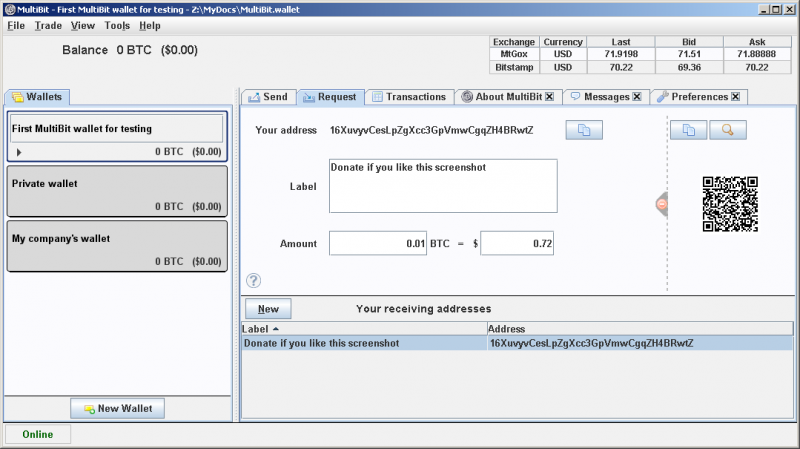
Getting the software set-up was as easy as visiting the MultiBit site, download, run the installer. Simple. They have good Getting Started instructions as well.
MultiBit is a lightweight client, therefore it does not download the entire blockchain, but does need to synchronize from remote hosts (via BitcoinJ).
One very nice thing about MultiBit is, you can drag a QR Code image into the wallet on the send screen and it will import it automatically (this is cool). We tested with the “Donate” QR code from multibit.org and it worked flawlessly.
There is fairly decent in app help, Good FAQ on the site and good support via various forums. The wallet supports multiple languages (35+ at this time) and includes a basic charting function for viewing your balance.
You can sign and verify messages via the private/public keys, which we don’t see in even some of the “enterprise” wallets. It is not often a standard user would need this, but it shows an understanding by the developer that we like.
It is worth a look through the preferences / settings to customize the software a bit to your liking.
We do have some trepidation as there have been troubles in the past with Multibit loosing bitcoin, which you can find on the various forums, but they seems be back from 2013. It is hard to tell if it is user issues or a bug. In almost all cases, the user was using 500+ addresses within the wallet.
One area that MultiBit really stands out from the crowd is its ability to have mutliple wallets open at one time. This is really great if you are segregating your funds between different wallets. Such as say, a personal wallet, small business wallet, savings wallet and so on.
Privacy
There is some privacy given up anytime you run a lightweight client, as it will scan for your addresses on a remote node. Otherwise, the app never asks for any personally identifying information.
Security
MultiBit is open source and can be viewed on GitHub. As well, all downloads can be checked via their signature.
All private keys are kept encrypted on your local machine (or on a USB stick) if you set a wallet password (not default though).
Pros
Bitcoin URI handling support.
Multiple separate wallets open at once.
Developers are active.
Cons
Limited exchanges supported for showing price.
No HD in this version, HD beta version available.
No password / encrypted wallet by default.
Summary
MultiBit is a great thin desktop wallet for the average user. It is often compared to Electrum, which is also a good choice here. MultiBit is the better choice if you plan to segregate funds and don’t want to spend time bouncing back and forth between open wallets. The addition of highly deterministic wallets in the future (and Trezor support) will really put MultiBit up there as a secure wallet that is accessible to the average user.
Posted by RikolaMint on 2:02 AM with 1 comment
 Important info
Wallet Type: Desktop
Verification: SPV
Multisig: No
Open source: Yes
Privacy : Good
Crypto supported: bitcoin
Vulnerability to malware: Vulnerable
Private key stored: client side
Pros
Cold wallet solution like armory, without the full node
HD wallet has been around for years
Cons
Download only
Old school UI
Summary
Electrum is a lightweight, simple downloadable hierarchical deterministic (HD) wallet. While it doesn't have all the features of competitors like Bitcoin Armory, it is a thin client meaning users needn't download the entire blockchain and act as full nodes to use the wallet.
The Electrum online wallet
The Electrum wallet is HD, meaning that the public keys are algorithmically connected to the private key, and thus wallets and all corresponding addresses can be restored with just the seed, at any compatible HD wallet provider. This is extremely convenient for users that require more than one address, as the first backup is all that is required to import to Electrum or compatible wallets all associated addresses as needed.

After download, users are asked if they would like to 1) create a new wallet, 2) restore an existing wallet from a seed, or 3) create a watch-only version of an existing wallet. When creating a new wallet, a seed, represented as a 12 word mnemonic passphrase, will be generated which must be written and stored securely offline, and the user must create the password used to un-encrypt the wallet. The password and seed are maintained only client-side. If both are lost, Electrum cannot restore the wallet, which would be locked forever.
If users would like to use Electrum for cold storage, they must follow the following process:
- Download Electrum, and place the executable file on a usb cable.
- Run the installation on an entirely offline computer.
- Generate the seed, navigate to settings->import/export, and copy the master public key to the usb.
- Create a watch-only Electrum wallet on the online computer, entering the public key when prompted.
- To sign transactions offline, create a transaction in the watch-only wallet. Electrum, detecting a seedless-transaction request, will ask where to save - save the transaction on the USB.
- Load the transaction on the offline wallet, sign, and return to the online client to complete the transaction.
Mobile
Electrum is not accessible from handheld devices.
Bottom Line
If you are looking for a client-side cold storage solution and you don't want to invest in specialized hardware, the decision comes down to Electrum or Bitcoin Armory. Electrum is a lighter solution that doesn't require downloading the blockchain. Armory is a heavier version filled with more functionalities, including a multiple-signature option. The HD functionality on Armory is more robust, but overall, it is a much more difficult solution to master. You really can't go wrong with either.
Posted by RikolaMint on 2:01 AM with 1 comment
 Important info
Wallet Type: Desktop
Verification: full Node
Multisig: Yes
Open source: Yes
Privacy : Good
Vulnerability to malware: Vulnerable
Private key stored: client side
Pros
Completely offline and free cold storage solution
Full node offers enhanced privacy
Configurable m of n settings
Cons
Difficult set up
Requires disused computer to use as cold storage
Some may not like running full node
Summary
Bitcoin Armory has arguably the most comprehensive set of wallet functionalities in the market. The online wallet is HD and has a flexible multiple-signature feature, meaning armory is among the top online wallets out there. But armory is perhaps best known for it's cold storage solution. Great online solution, great offline solution, one wallet.
Indeed, Bitcoin Armory provides enterprise cold storage solutions to some of the biggest names in the exchange marketplace, notably Bitfinex. If Bitfinex, the industry's largest USD/BTC exchange, has chosen Bitcoin Armory to protect it's bitcoin reserves, it is a good indication of the robustness of the solution.
There are two issues with Bitcoin Armory. The client is "thick" meaning that it requires the downloading and running of the entire blockchain, about 40gb and 2gb of ram to run. There is also, at time of writing, no mobile solution, which is very inconvenient for making transactions on the go.
The Bitcoin Armory Wallet
Bitcoin Armory cold storage
Cold storage eliminates the risk of client-side online storage, susceptible to malware, or server-side storage, with the threat of hacks, insider scams or insolvent operations. The only threat to cold storage wallets is physical theft, but securing against physical theft is much simpler than securing against viruses, keystrokes, trojan horses, and the threat of server-side meltdowns!

The armory cold storage system requires a private key to be held in a computer kept entirely offline. The corresponding public address is stored in the armory online wallet. The public address is called a "watching only wallet", as it has no corresponding private key online to sign transactions. While this type of address can receive bitcoin, outbound transactions may only be sent if digitally signed offline, with the signed transaction uploaded with a usb cable. Sounds complicated, but only takes a minute or two once you get the hang of it. Please see below a step-by-step guide to setting up the armory cold storage solution.
- Download armory on your regular PC.
- Copy the wallet to a usb drive.
- Install the wallet on the non-connected computer.
- Optional: encrypt the offline computer. Make sure you remember the passphrase!
- Make a paper or digital backup of the offline system, which should be stored safely.
- Create a Watching Only Wallet copy of the wallet in " wallet properties". Copy the wallet back to the USB drive.
- Transfer the wallet to the online computer. In wallet properties click on "belong to" and check "this wallet is mine.
- To sign transactions, create unsigned transactions in the online wallet, copy it to your usb, load it into the offline wallet, and sign offline. Then bring the transaction back to the online wallet, load it, and you've just signed with an entirely offline private key.
You've just created your cold storage system, and your private key is hermetically sealed from all the horrible malwares, trojan horses and other terrible things lurking on the internet!
Bitcoin Armory online wallet
The wallet is Hierarchical Deterministic (HD), meaning that multiple wallets can be set from the same private key, easily done through the armory interface. The multiple wallet function is very convenient, as you may organize different types of transactions according to wallet, which can help with auditing or accounting later. Within each wallet, multiple receiving addresses can be set, and descriptions added.
An additional value to the HD wallet feature is that a single paper or digital backup of bitcoin armory can restore all of the wallets and addresses that ever were or will be generated. Once the initial paper backup is made (and securely stored), a user will never need to make another backup.
Armory wallet encryption is meant to be tough against potential encryption-cracking techniques, and thus a passphrase is needed to un-encrypt the wallet. The user is the only one with access to the passphrase. If the passphrase is forgotten and no paper backup has been made, the wallet is lost forever!
There is a unique lockbox feature with flexible multiple-signature configurations, allowing from 1-2 to 7-7 signatures required. This flexibility is meant to allow scaling to suit families who would like husband and wife to cosign transactions, to large corporations requiring a certain number of executive signatures.
Mobile
Alas, Bitcoin Armory is meant for savings and has no mobile solution.
Bottom line
Bitcoin Armory is a very complex product for a new bitcoin user. Anyone can use it as a simple wallet, but to take advantage of its unique host of features and gain maximum security for your coin, you'll need to invest a bit of time in learning the system. If you master bitcoin armory, you'll never want to work with another wallet.
Despite relatively meager funding, Armory is at the forefront of bitcoin wallet innovation. If you don't mind downloading the blockchain and acting as a node, and you are ok using a different product for mobile needs, armory is arguably the best place to store your coin.
Posted by RikolaMint on 1:59 AM with 1 comment
 Important info
Wallet Type: Web
Verification: Trusted Server
Multisig: No
Open source: No
Privacy : Poor
Crypto supported: bitcoin
Vulnerability to malware: Vulnerable
Private key stored: server side
Pros
Insured wallets
Famous cold-storage solution
Issues debit cardCons
Horrendous support
Might not value your privacy as much as you do
Difficult and intrusive set up
Summary
Xapo likes to do things big. They brand their cold storage “deep” cold storage, and provide it free to customers. They describe a network of armed guards and and biometric scanners across diverse locations, each serving to guard private key fragments. They chat about sending part of their security structure into low orbit, to ensure that only cosmonautically-inclined hackers would have a chance of breaching Xapo’s server. They have a debit card that is connected directly to user’s account, and so they provide both security and an easy bitcoin off-ramp.
Where they fail, and miserably in our opinion, is in their management of the little things, and by little things we mean their customers. Of every bitcoin service we have reviewed Xapo has the absolute worst support. The internet is flooded with stories from customers of their inability to breach Xapo’s wall of silence. This author himself written four separate emails to Xapo, in the capacity of both of an interested customer as well as the owner of a bitcoin review site, and has never received a response. This, combined with a really poor debut for their debit cards, rife with hidden fees and bugs, draws a picture of a company with its head in the clouds and feet suspended somewhere mid air.
According to CEO and founder Wences Casares, Xapo aspires to be the Bank of America of digital currency. It’s financial backing and infrastructure gives this wallet company as good a chance as any. However, all gripes about Bank of America aside, they demonstrate a modicum of respect for the customers who entrust them their money. It’s a lesson Xapo would do well to learn.
Security
Famous for its "deep cold storage", Xapo boasts a network of offline servers and paper wallets protected by biometric scanners, radio-wave blocking cages and armed guards. These "vaults" are distributed across multiple geographic locations ensure that, even if a government were to bypass the cryptographic and physical security measures employeed, all other vaults would remain intact. More importantly, the vaults are insured by the Meridian Insurance Group, so even in the unlikely event of a breach, customer funds are protected. Xapo has recently been making waves with a plan to locate specific elements of its security architecture in a low Earth orbit satellite. Lest you immediately think that this smacks of a publicity stunt, Xapo explains that the satellite possesses a piece of data that can never change, absent a physical breach of the satellite. If there is a security breach back on Earth, the way in which the satellite communicates will change, thus instantly raising the alarm bell.
Entrance to the vault requires inputting your password, and you can choose to set up two factor authorization as well, which is recommended. Additional users can be granted access to your vault as well to implement multiple signature functionality. Minor irritant - every additional click forward or backwards through the vault requires an additional password input, which seems redundant and interrupts user flow.
Transferring money into the vault requires inputting address and ID number, and depending on your location, they might refuse service. US and European customers should be fine. Vault withdrawals are time delayed by 48 hours, during which time a series of authentication measures are undertaken to ensure request integrity. The progress of this authentication procedure can be followed in a users transaction history.
The Product
Xapo has a beautifully designed website with intuitive navigation and integrated, step by step directions for all the Xapo features offered. Debit card management, vault and hot wallet access, and all accounting features are available on both desktop and excellent iOS and Android mobile solutions.
The Xapo Debit Card
The online wallet can be likened to a checking account, meant only to hold day-to-day funds. And as is custom with checking acccounts, Xapo offers debit cards issued by Visa, but these come in EUR, USD and GBP varieties. Unlike for instance e-coin, which operates like a prepaid card which must be filled with currency prior to usage, the Xapo card pulls bitcoin directly from your online hot wallet, quickly makes an exchange on bitstamp, and the merchant - or cash dispenser - pays out in fiat.
Please find below the fee schedule and limits.
Fee Description Amount
USD EUR GBP
Odering fee Includes standard shipping $20.00 €18.00 £13.00
Annual Fee First year free $12 €10 £7
Withdraw cash ATM domestic $2.50 €2.25 £1.75
Declined transaction $1.00 €1.00 £1.00
Non-local currency transaction Currency conversion 3% 3% 3%
Point of Sale charge 0 0 0
Services Card replacement $5.50 €4.50 £4.50
Removal of unused funds $10.00 €10.00 £10.00
Xapo Debit Card Limits
The Upgrading of limits requires submission of proof of identification and address.
Standard Limits Upgraded Limits
USD EUR GBP USD EUR GBP
Purchase limit (per purchase) $2,500 €2,500 £ $10,000 €10,000 £8,000
Purchase limit (per day) $2,500 €2,500 £ $20,000 €20,000 £16,000
Purchase Limit (lifetime) $2,500 €2,500 £ NoLimit NoLimit NoLimit
ATM Withdrawal (per transaction) $200 €200 £ $1,000 €1,000 £800
ATM Withdrawal (per day) $400 €400 £ $2,000 €2,000 £1,600
ATM Withdrawal (lifetime) $1,000 €1,000 £ NoLimit NoLimit NoLimit
There was much customer dissatisfaction with high fees that were not properly disclosed by Xapo, but Xapo explained that this was due to miscommunication with the third-party card issuer, and there isn't much reason not to take them at their word. They were honorable in refunding monies to affected customers. Additional technical hiccups don't detract from the potential of this service.
Bitcoin account management
Xapo offers users the ability to create multiple wallet addresses, each with custom administrative permissions. When first setting a wallet, an admin can add users and set permission levels, including their ability to make transfers from the account, designate users as transaction approvers, and set their approval threshold. While this can be useful for a family account - as debit card-linked accounts can be allocated to children, for instance, with designated spending levels - for institutional clients it allows robust accounting and fund allocation between teams or departments, client investment accounts, savings accounts, spending accounts, etc. A partnership with bitwage allows full payroll management directly from Xapo, with employees receiving funds into debit-card enabled accounts instantly.
In a sign that Xapo is looking to become a one-stop bitcoin shop, wire transfers are now accepted to fund Xapo accounts. Aside from client-side bank charges and any applicable conversion fees, Xapo charges a 1% fee, and the bitcoin should appear in customer accounts within 2-5 days.
Mobile
Xapo offers the full functionality available on its desktop client through ios and android applications. Transactions are synced in real time across all user devices. Users can send payments via email, QR code or vault address, and debit card are manageable directly from the app interface.
 Bottom Line
We could be looking at a future titan of the digital currency market. Xapo combines insured, bank-grade savings account security with easy access and usability for spending cash. We would like to see bitcoin's status as cost-free interlocutor between currencies leveraged for lower debit card fees. Keep an eye on Xapo's actions in Mr. Casares' home country of Argentina, where Xapo has disruptive potential.
Posted by RikolaMint on 1:58 AM with 1 comment
 Important info
Wallet Type: Web
Verification: Trusted Server
Multisig: Yes
Open source: No
Privacy : Poor
Crypto supported: bitcoin
Vulnerability to malware: Vulnerable
Private key stored: both client and server side
Pros
Extremely robust and adjustable multisig
Excellent accounting tools integrated
Offers enterprise solution for merchantsCons
Retail clients, when accepted, were charged annual fee above 1 btc held
Have shifted focus entirely to enterprise solution
Pivot portends of monetization issues
Summary
CoinKite wraps all the latest in bitcoin wallet innovation in a user-friendly, multi-device platform designed to appeal to both bitcoin newcomers and veterans with more exacting technological requirements. Offering advanced multiple signature functionality, 32BIP HD wallet convenience and client-side seed generation and encryption, CoinKite delivers an extremely secure wallet while maintaining ease of use, fund accessibility and privacy.
There are five different plans available to users, ranging from a free service allowing one multisig sub-account and a limit of 1 BTC storage in the hot wallet, to an enterprise solution offering a range of specialized merchant-related services and features.
The Coinkite Wallet
Coinkite offers three different types of wallets: a hot wallet, a multisig vault, or a watch-only wallet.
All wallet types are BIP32 Hierarchical Deterministic, meaning that users can generate as many bitcoin addresses as they would like from a single "seed". All the addresses will be mathematically connected to the master public key contained within the seed, which itself is connected algorithmically to the private key. So all addresses created in the future from the public key are tied back to the seed. This has a few important benefits.
First, if needed the user can restore all wallet addresses ever created with just the seed. This is very convenient compared to traditional wallets, in which backups need be generated after each new address is created. Thus, if coinkite were to fail, or a user were to lose his password, all addresses could be restored on any other BIP32 wallet provider, with just the seed. Second, HD wallets allow users to create additional addresses online, while keeping the private key entirely offline for security.
When opening a hot wallet users receive their public and encrypted private key by email. Funds are held in CoinKite's proprietary "Hardware Secure Module" (HSM), which they describe as being unique to cold storage, but with easier access. The second key, called the symmetric key, is held on the CoinKite server and is necessary to extract the hot wallet funds held in HSM (and this is managed automatically by CoinKite). This means that the hot wallet funds are not entirely in control of the user. In a CoinKite statement on the matter: "Coinkite has committed that in the event of the closure or other failure of the business, we will publicize the symmetric key protecting the xprivkey values that have been distributed to members. With that key, each user can recover their own funds by re-generating the private keys". The system provides great security, but is meant only to hold spending cash. Bitcoin savings should be held in the multisig account, which is controlled entirely by the client.

The multisignature account can be set to require from 1-1 to 15-15 signatures, and everything in between. The different signing levels allows configurations suitable for a single household in which wife and husband signatures are required, or a larger business in which, say, 5 of 8 principles are needed to sign off transactions. The signature requirements, which can be set once at account opening, can be adjusted to suit the particular needs of a client.
In a multisig scheme, each signature has it's own corresponding private key. CoinKite offers a number of different ways of holding that key.
The easiest way is within CoinKite's HSM server, where users may choose for the key to be encrypted behind a mnemonic password. CoinKite also offers a client-side private key generation option, which means it is never seen server side. There are additional options, if required, to generate the private keys offline entirely. Non-CoinKite users can be invited to hold keys as well. The client-side key generation is offered as a solution for them, though to take advantage of key storage in the HSM server they would need to open an account.
Watch-only accounts are used to monitor addresses held elsewhere. When opening a Watch onliny account, simply enter the public address. CoinKite will monitor the blockchain and display inbound and outbound transactions made from the watch-only address, but there is no access to the addresses funds.
Different account types
One of the big questions in the bitcoin wallet space is how products can be monetized, and venture capital is pouring into the segment in the belief that there is a profitable answer to the question. While the free services are fantastic, for continued innovation and investment, eventually there will have to be some money in it for the service providers.
CoinKite's has a basic free service, and an additional four different account types, personal, professional, business and enterprise.

The free and personal accounts are geared towards individual users. The free service allows only one hot wallet and one multisig account, each with only one sub account (i.e. an additional address within the wallet). There is a limit of 1 BTC that can be held in the hot wallet. These limitations on the account can be a bit frustrating, so for more serious bitcoin users, the personal account might be more convenient. At a cost of $93.99 a year, users are allowed an additional two multisig accounts, 10 subaccounts, which are additional addresses within wallets to group payments, etc, unlimited hot wallet funds, and unlimited importation of private keys. Paid users also are sent a free debit card, which can be used at CoinKite's payment terminals.
The professional, business and enterprise accounts are geared towards merchants of various sizes who are utilizing CoinKite's payment terminals, although the professional account could be useful for individuals paid from multiple sources in bitcoin who need different accounts for auditing and bookkeeping. Gradually larger amount of accounts and payment terminal links are offered, along with a host of additional features.
Mobile
While they have not yet released an app, CoinKite is responsively designed, and all functionalities are available through any handheld device.
Bottom line
CoinKite's user-friendly product offers instant access to funds with bank grade security. The flexible multisignature wallet is one of a kind, and the HSM storage units find a great balance between access and security. Indeed, CoinKite has begun selling HSM units to bitcoin companies who at times struggle to juggle supply between hot and cold wallets.
For individual accounts, they bring needed innovation in security to the bitcoin industry, and this is worth shelling over a few extra bucks for an account upgrade. For merchants, their enterprise solution, offering both point of sale hardware and a robust reporting and accounting backend, is arguably the best in the market.
 Hive bitcoin Wallet is an amazing wallet and there are a ton of features. Today, we will be covering all of these features. For starters, Hive wallet is available only for Mac OS. To want to use this wallet on a Windows computer is simply not possible so keep this in mind. There is no reason not to go with this amazing wallet service Hive because there are so many features good support and excellent programs to use when using this Bitcoin wallet.
 Benefits Of Simplicity:
One of the benefits of the Hive Bitcoin Wallet is the ability to start right away and be able to get the access you would like to the Bitcoin wallet from any device you would be able to think of! This Bitcoin wallet is very user-friendly and is available from any device whether it be an iPad iPhone or Mac computer.
More than Just A Bitcoin Wallet:
Yes, Bitcoins are great but what about the other digital crypto currencies such as Litecoin? Well, with Hive you will be able to store both Bitcoin and Litecoin and other currencies are going to be added very soon. So if you are looking for a wallet to hold all of your Bitcoin and Litecoin then this is the wallet that you should choose because it will help you keep the money digital money that is secure and safe and give you a great ease of access.
Hive The Desktop Version Of The Wallet:
Being able to access your wallet from the computer browser is great but now you can even access the Hive Bitcoin wallet with a Mac computer or an Android or iOS device. There are many ways to access the Hive Bitcoin wallet so take advantage of all ways so you will be able to get access to the coins you want when you want to. No more hassles of being locked out of the Bitcoin or Litecoin Wallet Hive but more freedom to do what you want with the coins that you own and not have to worry about losing these precious resources.
The Hive Team:
The hive wallet is being developed by a group of committed and professional people who will leave no stone unturned.
Mac Friendly Mac Exclusive Wallet:
You should know that this Bitcoin wallet is not for Windows but for Mac users. So if you are a PC user you may as well just find another wallet because there are no plans in the future to support Windows users and they are focusing only on Mac users. So if you have an Android or iOS device you can still use Hive Bitcoin wallet but if all you have is a personal computer then you will not be able to get the Hive wallet to be able to work for you. The reason the Hive Bitcoin Wallet only accepts Mac users is because the program was written specifically for Mac users and that means the company would have to write a whole different program just to have it work for Windows. There are no current plans to make a version for windows remember that if thinking about getting this Bitcoin wallet and not being able to have access to a Mac computer.
Install Java To Have Hive Work Correctly:
One thing you are going to need to do is install the latest version of Java to have Hive Bitcoin wallet work correctly. There are allot of people wondering why the Hive Bitcoin wallet is not opening correctly and the answer from the Hive Bitcoin wallet about this is that there needs to be the proper version of Java installed. So just download Java it is free and you shouldn’t have any problems using the Hive.
Low Transaction Charges With Hive Bitcoin Wallet:
One thing to note is that you will not be able to change the transaction fee when sending Bitcoin but for most transactions the cost is only 100 bits. This is a low fee so no worries it most of the time shouldn’t affect anything you are going to buy to be on the safe side just make sure you have 100 bits extra to send to cover the transaction fees to ensure the person you are buying from actually gives you the product exactly what you are paying for and does not ask you to send more Bitcoin as that will probably cause a charge of another 100 bits.
No Getting Password Back If Lost With Hive:
One thing you should know about Hive is that if you lose your password you are not going to be able to get it back. So make sure you keep a printed document with the password to your Bitcoin wallet so you are never going to lose this information. Put this information in a safe or safe place and you will not have a problem losing your Bitcoin password. Also remember even though there is security around your account you want to make sure not to have the password that you have be an easy password so people can just guess it and get into the Bitcoin Hive account that you have.
Conclusion:
Hive doesn’t hide it that it is for Mac users so if you are not a Mac user and don’t have an Android or iOS device then you will not be able to use this wallet. Safe, Secure and ready is what this wallet is in three simple words so keep that in mind when trying this wallet for all you Mac users enjoy a Bitcoin Wallet made specifically for your device. It has a differnet approach to bitcoin wallets as compared to the other wallets, but its worth checking out.